
To learn how to fix tech neck pain caused by looking down at laptops, separate your screen from your keyboard immediately. Elevate your display to eye level, pair it with external peripherals, and perform targeted deep-neck flexor exercises daily.
Six months ago, a dull ache at the base of my skull turned into daily upper-trapezius spasms after eight-hour writing sprints. I assumed buying an expensive ergonomic chair would solve the problem, yet my neck still burned by 2:00 PM every afternoon. Fixing the pain required measuring my actual viewing angle and breaking the physical design flaw baked into every portable computer.
Why Laptops Destroy Your Cervical Spine (And What My Desk Audit Revealed)
Laptops force an impossible mechanical compromise because the screen and keyboard sit inches apart. When your hands rest comfortably on the deck, your eyes must angle downward at 35 to 45 degrees.
According to Cleveland Clinic, tilting your head forward at a 45-degree angle increases the effective weight on your cervical spine from 12 pounds to nearly 49 pounds. Your posterior neck muscles act like overloaded suspension cables trying to keep your skull from dropping onto your chest.
I ran a 14-day desk audit using a simple tape measure and a posture-tracking reminder app to isolate the culprit. Sitting at my 29-inch dining table, the top bezel of my 14-inch laptop sat just 38.5 inches off the floor, while my seated eye level measured 47 inches. That 8.5-inch vertical drop forced my neck into constant flexion for six hours a day. During week one, I raised the screen without changing anything else, and my afternoon tension headaches dropped by roughly 60 percent within four days.
Step 1: Fix Your Laptop Ergonomics by Separating Screen and Keyboard
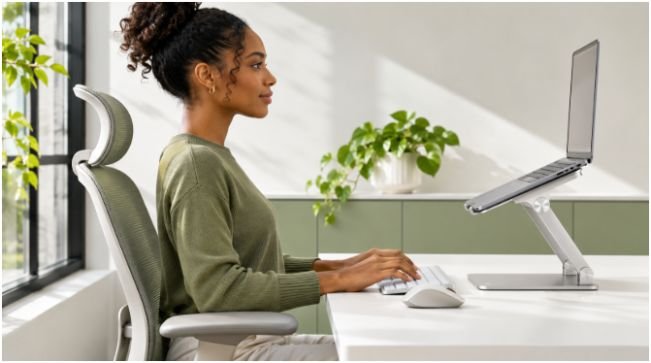
You cannot out-stretch a broken workstation geometry. Eliminating forward head posture starts with decoupling where you look from where you type.
Elevate the Display to Eye Level
Place your laptop on a rigid aluminum riser or a dense stack of hardcover books until the top edge of the screen aligns with your eyebrows. Keep the monitor roughly an arm’s length—between 20 and 26 inches—away from your face. The Occupational Safety and Health Administration (OSHA) notes that positioning the top of the monitor at or slightly below eye level keeps your neck in a neutral, unloaded alignment.
Switch to External Peripherals
Once your laptop sits eight inches in the air, typing on its built-in deck wrecks your shoulders and wrists. Connect a low-profile wireless keyboard and an external mouse directly on your desk surface. Let your upper arms hang relaxed beside your ribcage with your elbows bent at 90 degrees and your forearms parallel to the floor. While optimizing your desk layout, incorporating quick hand stretches to prevent carpal tunnel from typing keeps your wrists equally protected during long sessions.
Recline 25 Degrees Instead of Sitting Ramrod Straight
Forcing yourself to sit upright at a rigid 90-degree torso angle fatigues your spinal erectors within twenty minutes, causing you to slump forward again. Unlock your chair’s tilt mechanism and recline backward between 25 and 30 degrees with firm lumbar support. Research highlighted by NewYork-Presbyterian Health Matters confirms that leaning back slightly transfers upper-body gravitational load into the chair backrest, taking massive pressure off your cervical muscles.
Anchor Your Feet at 90-Degree Angles
Dangling legs pull your pelvis forward and round your lower back, which triggers a chain reaction that juts your chin toward the screen. Adjust your pneumatic seat cylinder until your hips, knees, and ankles each form crisp 90-degree angles. If raising your chair to match a high desk lifts your heels off the carpet, slide an angled footrest underneath your soles. Mastering this lower-body foundation is central to maintaining a correct sitting posture for programmers and writers alike.
Step 2: Daily Stretches and Strengthening Exercises That Actually Reverse Stiffness

Raising your monitor stops new strain, but weak deep neck flexors and tight pectoral muscles will still pull your head forward out of habit. Adding four targeted movements to my morning and mid-afternoon breaks cleared my lingering base-of-skull tightness during week two of my experiment.
Chin Tucks for Deep Neck Flexor Activation
Sit tall against your backrest and look straight ahead at a fixed point on the wall. Glide your chin straight backward horizontally—creating an intentional double chin—without tilting your nose up or down. Hold this retracted position for five full seconds, release slowly, and repeat 10 times every two hours to wake up the deep stabilizers along the front of your spine.
Doorway Chest Stretches to Undo Rounded Shoulders
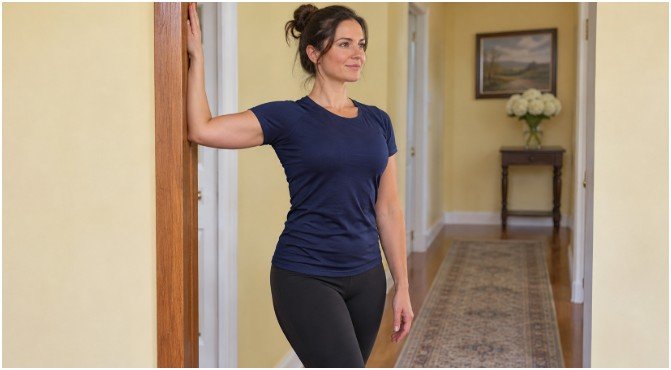
Hours of typing shorten your pectoralis minor muscles, which yanks your shoulder blades forward and rounds your upper back. Stand inside an open doorway, place both forearms flat against the vertical trim at 90-degree angles, and step one foot forward until you feel a firm pull across your chest. Hold this stretch for 25 seconds while breathing deeply into your ribs, then switch your lead foot and repeat once more.
Upper Trapezius Releases and Scapular Squeezes
Anchor your right shoulder down by sitting directly on your right palm, then gently tilt your left ear toward your left shoulder until the side of your neck lengthens. Hold for 20 seconds per side without forcing the pull. Follow this release with 12 scapular squeezes by pulling your shoulder blades back and downward toward your spine as though pinching a pencil between them for five seconds per rep.
Step 3: Workday Micro-Habits to Prevent Afternoon Flare-Ups

Even an impeccably calibrated workstation causes ischemic stiffness when your muscles stay locked in static contraction for hours. Set a silent 40-minute timer on your phone or watch to stand up, walk to the kitchen for water, and roll your shoulders backward ten times.
Increase your operating system display scaling by 10 to 15 percent so small spreadsheet cells or code blocks never tempt you to crane your neck closer to the glass. At the end of a heavy workday, drape a microwavable moist heat pack across your upper shoulders for 15 minutes to boost local blood flow and flush out metabolic tension.
When Neck Stiffness Requires a Doctor Instead of a Laptop Stand
Mechanical muscle strain responds predictably to height adjustments and movement within two to three weeks. However, persistent discomfort that refuses to budge after a month of ergonomic changes warrants a physical therapy evaluation to rule out cervical facet joint irritation or disc compression.
According to the Mayo Clinic, you should seek prompt medical care if neck pain radiates down one arm, triggers numbness or pins-and-needles tingling in your fingers, or causes sudden grip weakness. Never attempt aggressive self-massage or heavy neck traction when nerve root symptoms appear.
Frequently Asked Questions About Laptop Neck Pain
1. How long does it take to fix tech neck pain from a laptop?
Most mild muscular tech neck improves within 7 to 14 days once you raise your laptop to eye level and perform daily chin tucks.
2. Is a laptop stand better than an external monitor for neck pain?
An external monitor offers superior screen real estate, though a sturdy laptop stand paired with a separate keyboard achieves identical eye-level ergonomics.
3. Does sleeping without a pillow help cure tech neck?
Sleeping flat on your back with a thin, supportive cervical pillow keeps your spine neutral, whereas ditching a pillow entirely often strains side sleepers.
4. Can a posture corrector brace fix laptop neck pain permanently?
Posture braces provide temporary tactile reminders, but relying on them weakens your upper-back muscles instead of building lasting postural endurance.
Ditch the Laptop Hunch Before Your Spine Invoices You
Your laptop was engineered for airport lounges and coffee shops, not forty-hour workweeks on a flat tabletop. Grab three thick hardcover books right now, slide them beneath your laptop until the top bezel meets your eyes, and pair a spare keyboard before opening your next tab.