
Two years ago, I woke up at 3:00 AM with a dead, tingling thumb and index finger after wrapping up a 5,000-word sprint. That wake-up call forced me to build a strict routine of daily wrist and hand stretches to prevent carpal tunnel from typing before minor forearm tightness turned into permanent nerve damage. By spending just two to three minutes every 90 minutes on targeted stretches, tendon glides, and nerve sliders, I eliminated my nighttime numbness and kept my hands pain-free through 10-hour keyboard days.
Why Typing Triggers Median Nerve Compression (And What Actually Helps)
Your carpal tunnel is a rigid, narrow passageway on the palm side of your wrist bounded by bones and ligaments. Nine flexor tendons and the median nerve share that cramped space. According to the National Institute of Neurological Disorders and Stroke (NINDS), repetitive finger motions cause the lubricating membranes around those tendons to swell, which squeezes the median nerve against the transverse carpal ligament.
Typing itself is rarely the sole villain. Holding your wrists bent upward over a thick mechanical keyboard or reaching sideways for a mouse spikes pressure inside the tunnel by up to 300 percent. Over months, sustained micro-trauma restricts blood flow to the nerve and triggers burning, tingling, or grip weakness.
Static Stretches vs. Tendon and Nerve Glides
Most desk workers only do basic backward wrist pulls, which miss half the mechanical problem. A complete preventive routine requires two distinct movements:
- Static Forearm Stretches: These lengthen tight flexor and extensor muscles in your forearm so they stop pulling constantly on your wrist bones.
- Tendon and Nerve Glides: Unlike static holds, gliding exercises move the tendons and median nerve smoothly past one another through the tunnel without stretching them to their breaking point.
My 3-Minute Daily Desk Stretch Routine for Pain-Free Typing
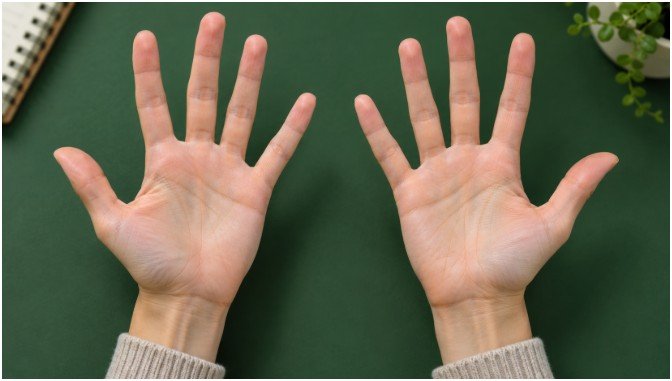
I set a silent timer to run through these four movements every 90 minutes. You do not need special gear, and the entire sequence takes less than two minutes at your desk.
1. Wrist Flexor Stretch
Extend your right arm straight out at shoulder height with your palm facing the ceiling. Use your left hand to gently pull your right fingers down toward the floor until you feel a mild, steady pull along your inner forearm. Hold this position for 20 seconds without bouncing, release slowly, and repeat twice per arm.
2. Wrist Extensor Stretch
Keep your right arm extended straight ahead, but flip your palm so it faces the floor. Place your left hand over the back of your right knuckles and gently press downward so your fingertips point toward the ground. You should feel tension release along the top of your forearm. Hold for 20 seconds and complete two rounds on each side.
3. The Prayer Stretch
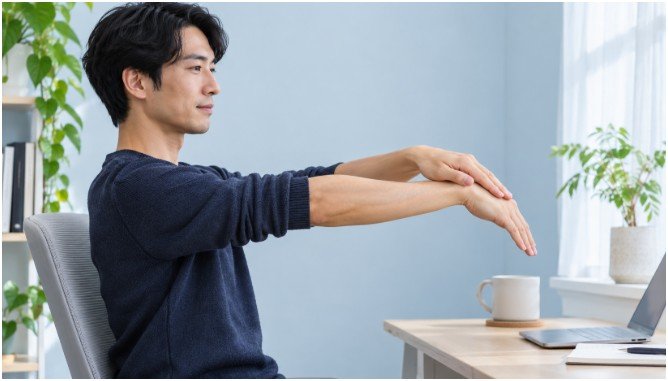
Bring your palms together in front of your chest just below your chin, keeping your elbows pointed outward. Press your palms flat against each other and slowly lower your hands toward your beltline until a clean stretch develops under both forearms. Pause at the bottom for 20 to 30 seconds, then return to the starting position and repeat three times.
4. Finger Spread and Water-Flick Shakeout

Splay all ten fingers as wide apart as possible for five full seconds to activate the tiny intrinsic muscles inside your palms. Relax your hands completely, then shake them loosely at your sides for 30 seconds as if flicking cold water off your fingertips. This simple shakeout boosts fresh capillary circulation into stiff finger joints.
Tendon and Median Nerve Glides to Clear Tunnel Friction
After warming up your forearms with static stretches, use gliding drills modeled on the American Academy of Orthopaedic Surgeons (AAOS) therapeutic exercise program to keep internal tissues sliding freely.
Five-Position Tendon Glides
Start with your elbow bent, forearm upright, and fingers pointing straight toward the ceiling. Move slowly through five distinct hand shapes, holding each position for three seconds:
- Straight Hand: Keep all fingers extended upright with your thumb relaxed beside your index finger.
- Hook Fist: Bend only the top two joints of your fingers while keeping your main knuckles straight, forming a tight claw.
- Full Fist: Curl all finger joints tightly into your palm with your thumb resting across your middle finger.
- Tabletop: Straighten your fingers while bending strictly at your large base knuckles to form a 90-degree L-shape.
- Straight Fist: Keep your top two finger joints straight while tucking your fingertips flat against the base of your palm.
Run through this five-shape sequence five times per hand. Never rush the transitions; smooth, deliberate control maximizes tendon excursion.
Gentle Median Nerve Sliders (Without Over-Tensioning)
Nerves hate being stretched aggressively, so treat this movement as a gentle floss rather than a deep pull. Keep your head upright and looking straight ahead—tilting your neck away adds unnecessary nerve strain.
Start with a loose fist and your thumb resting outside your fingers. Straighten your fingers upward, bend your wrist slightly backward, and extend your thumb out to the side. Slowly rotate your palm away from your body until you feel a faint, warm tingle in your palm. Hold for three seconds, return to a loose fist, and repeat five times per side. If you have healthy, non-irritated wrists, you can apply feather-light pressure to your thumb with your opposite hand, though skipping the extra pull is safer for daily prevention.
Hidden Desk Habits That Sabotage Your Wrist Stretches
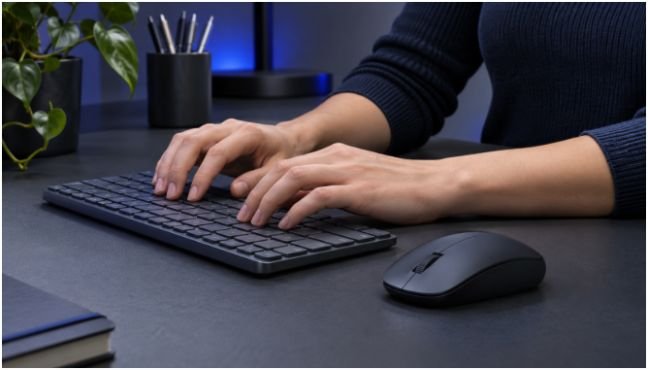
Stretching for three minutes cannot undo seven hours of bad workstation geometry. Once I fixed three subtle setup flaws, my daily wrist fatigue dropped overnight.
First, flip down the little plastic kickstands on the back of your keyboard. Propping up the rear edge tilts the keys toward you and forces your wrists into constant upward extension while you type. Keeping your keyboard completely flat—or angled slightly downward on a negative-tilt tray—lets your hands hover in a neutral line.
Second, stop resting your wrists on hard desk edges or plush gel pads while actively typing. According to OSHA computer workstation guidelines, pressing your soft carpal tunnel against a surface compresses internal tissues directly. Use palm rests only during brief pauses between sentences, and keep your elbows aligned with a correct sitting posture for programmers so your forearms float parallel to the floor.
Third, pull your mouse closer to your torso. Reaching outward for a wide mouse forces your wrist to angle toward your pinky finger (ulnar deviation), pinching the tunnel from the side. Switching to a compact tenkeyless keyboard brings your mouse four inches closer to your centerline. While you are resetting your desk habits every hour, pair your wrist breaks with natural ways to relieve dry eyes so your upper body and vision recover together.
Safety Rules and Red Flags You Should Never Ignore
Stretching should always feel like mild, relieving tension—never sharp pain, electric zaps, or burning. If a nerve glide triggers immediate pins and needles, stop right away and reduce your range of motion during the next session.
Consult a physician or certified hand therapist if your symptoms cross into clinical territory. As the Mayo Clinic notes, persistent nighttime numbness that wakes you up, frequently dropping coffee mugs, or visible muscle flattening at the base of your thumb indicate advanced nerve compression that requires medical evaluation rather than home exercises alone.
Frequently Asked Questions About Typing Wrist Stretches
1. How often should I do wrist stretches when typing all day?
Perform two to three minutes of gentle stretches and tendon glides every 60 to 90 minutes of continuous keyboard work.
2. Can wrist stretches cure existing carpal tunnel syndrome?
Stretches relieve mild tightness and prevent early irritation, but moderate-to-severe nerve compression requires medical splinting, physical therapy, or clinical treatment.
3. Are wrist compression braces better than stretching while typing?
Wearing a rigid brace while typing often forces you to fight the splint with your fingers; wear neutral wrist splints at night instead, and keep your hands moving freely during the day.
4. Why do my fingers tingle during median nerve glides?
Tingling means you are pulling the median nerve too aggressively, so immediately reduce how far back you bend your wrist and keep your head centered.
Drop the Keyboard Feet and Give Your Wrists Three Minutes
Your hands carry your entire career, yet they usually get zero maintenance until numbness sets in. Reach behind your keyboard right now, snap those plastic tilt legs flat against the desk, and run through one round of the prayer stretch and five-position tendon glides before your next email.