By 4:00 PM every weekday, my eyes felt like someone had rubbed fine sandpaper across my corneas. I kept asking myself: why do my eyes burn after staring at dual monitors all day, even when I wear blue-light glasses and drink plenty of water?
After two weeks of testing my workspace with a lux meter and an optometrist’s checklist, I found the culprit. Running two 27-inch displays side by side does not just double your screen real estate—it compounds the optical stressors behind Computer Vision Syndrome.
Here is the exact physiological breakdown of why dual screens scorch your tear film, along with the precise hardware calibration steps that stopped my afternoon eye burn.
The Real Reason Dual Monitors Trigger Burning Eyes (Computer Vision Syndrome)
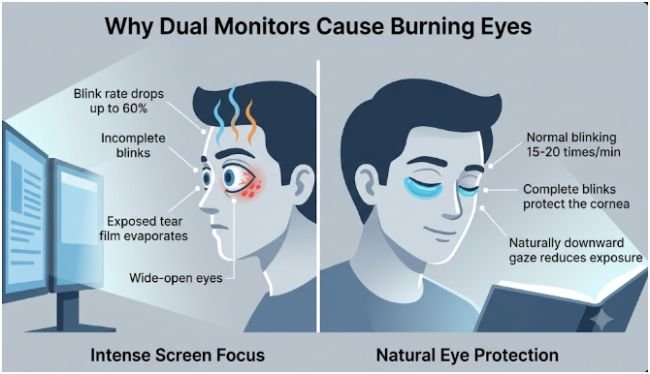
Computer Vision Syndrome occurs when the visual demands of a digital task exceed your eyes’ ability to comfortably process them. Adding a second monitor multiplies focal shifts, doubles emitted light, and alters your eyelid posture for eight or more hours straight.
Incomplete Blinking and Rapid Tear Film Evaporation
When you read printed paper, you blink roughly 15 to 20 times per minute. According to the American Academy of Ophthalmology (AAO), intense focus on digital screens drops your blink rate by up to 60 percent.
Worse, most screen blinks are incomplete—your upper eyelid fails to meet your lower lid. Without a full blink, your meibomian glands cannot spread fresh lipids across your eye, leaving the watery tear layer exposed to air. Research from the National Eye Institute (NEI) confirms that an unstable lipid layer accelerates tear evaporation, which creates that unmistakable stinging, gritty sensation by mid-afternoon.
Micro-Refocusing Across Mismatched Focal Planes
Digital characters lack sharp, solid edges; they consist of glowing pixels that are brightest at the center and fade toward the borders. Your crystalline lens must constantly micro-adjust to keep those edges sharp.
When you bounce your gaze between a primary monitor and a secondary screen—especially if one sits two inches closer or three degrees higher—your ciliary muscles fire hundreds of times an hour. That continuous accommodation fatigue manifests as a deep, burning ache behind your eyes.
Double Surface Luminance and Pupillary Fatigue
Two 27-inch monitors push nearly twice the total light energy toward your face compared to a single panel. When I measured my own desk before calibrating, my primary IPS display was blasting 240 nits while my older secondary monitor sat at 165 nits with a cooler blue tint.
As Harvard Health Publishing notes, severe contrast between screen brightness and surrounding room light forces your pupils to constrict and dilate repeatedly. Glare from overhead LED fixtures or an unshaded window washes out screen contrast, forcing your visual system to strain harder just to separate text from background.
Palpebral Fissure Exposure and HVAC Airflow
Most dual-monitor users mount their screens too high so they can look straight ahead. Looking horizontally or slightly upward widens your palpebral fissure—the vertical opening between your upper and lower eyelids.
A wider opening exposes up to 30 percent more of your ocular surface to indoor air. Combine that exposed corneal surface with dry office air conditioning or a desk fan, and your tear film evaporates faster than your lacrimal glands can replace it.
Undiagnosed Astigmatism and Vergence Strain
Minor refractive errors that go unnoticed during a morning commute become glaring liabilities across a 50-inch dual-screen span. Even a 0.50-diopter uncorrected astigmatism forces your extraocular muscles to work overtime to fuse two separate images into one clear picture, triggering burning, dryness, and temple tension.
My 14-Day Dual-Monitor Calibration Audit: What Actually Stopped the Burn
Generic advice tells you to “lower your brightness” and “take breaks,” which rarely solves a multi-monitor problem. Over 14 workdays, I systematically adjusted one hardware variable every three days and logged my afternoon burning score on a 1-to-10 scale. My baseline pain score started at an 8; by day 14, it dropped to a 1.
| Desk Variable | My Uncalibrated Setup (Pain: 8/10) | My Calibrated Setup (Pain: 1/10) | Why It Worked |
| Screen Luminance | Left: 240 nits / Right: 165 nits | Both locked at 95 nits | Eliminated pupillary constriction shifts |
| Color Temperature | Left: 6500K / Right: 7500K | Both matched at 5500K | Removed harsh blue-spike contrast |
| Viewing Distance | Left: 22 in / Right: 27 in | Both equidistant at 25 in | Stopped ciliary focal-length hunting |
| Monitor Height | Top bezel 2 inches above eye level | Top bezel 1 inch below eye level | Reduced exposed corneal surface area |
Step 1: Matching Luminance (Nits) and Color Temperature
I opened a blank white browser window on both screens and adjusted the OSD brightness sliders until both displays matched the brightness of a white sheet of paper held beside them. In a typical home office lit to 300 lux, that sweet spot lands between 80 and 100 nits—roughly 25 to 35 percent brightness on modern monitors.
Next, I set both displays to the exact same color preset (5500K during daylight hours) and added a 6500K bias light strip behind the center bezel. If you work late hours, pairing matched daytime calibration with dedicated strategies to prevent digital eye strain during late night coding sessions keeps your pupils from fighting dark-room glare.
Step 2: Setting a Symmetric V-Angle at 24 Inches
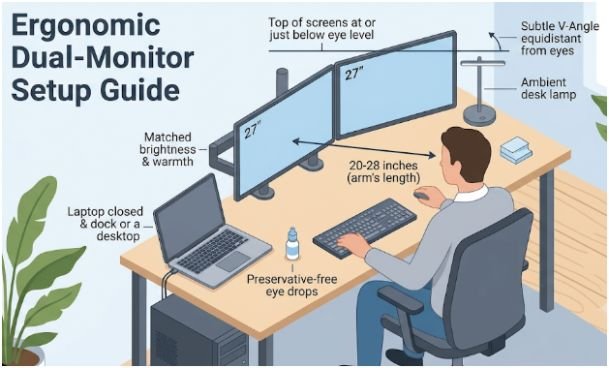
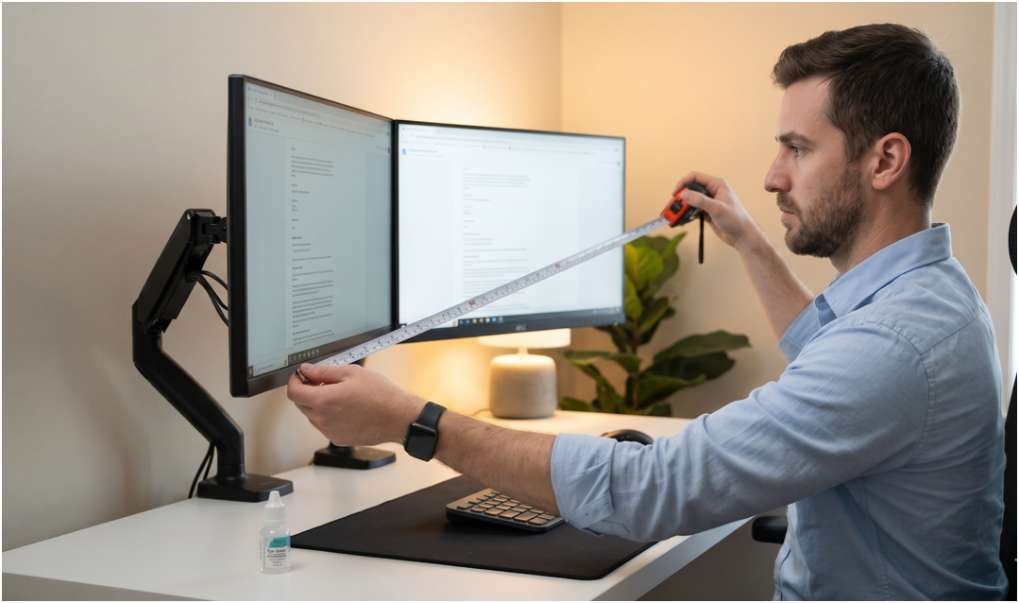
Following OSHA computer workstation guidelines, I positioned both monitors at an exact 25-inch arm’s length from my nose. Instead of lining them up flat like a wall, I angled both screens inward at a gentle 15-degree V-shape.
This symmetric arc keeps every corner of both screens equidistant from my eyes, eliminating focal-length recalculations when I glance from Slack on the right to spreadsheets on the left. I also lowered my dual monitor arm so the top edge of each bezel sits one inch below my seated eye line, allowing my eyelids to droop naturally and shield my corneas.
Step 3: Lubricating Drops and Structured Visual Breaks
Hardware fixes cut my eye strain by 70 percent, while targeted habits handled the remaining 30 percent. I placed a bottle of preservative-free carboxymethylcellulose artificial tears directly under my primary monitor and applied one drop at 11:00 AM and 3:00 PM—before the burning started. Avoid vasoconstrictor “redness-relief” drops, which shrink blood vessels temporarily and trigger worse rebound irritation.
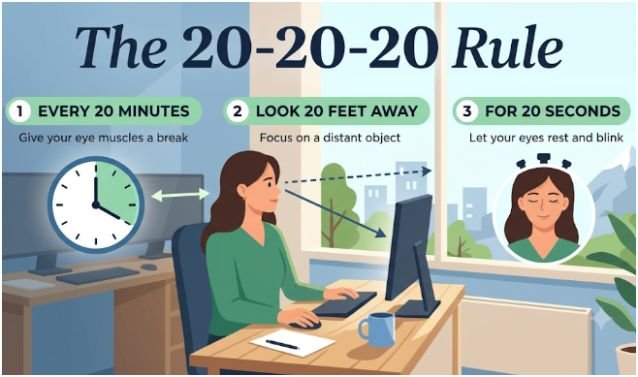
I also installed a menu-bar timer to enforce structured visual resets. Practicing deliberate 20-20-20 rule exercises for reducing monitor eye fatigue every 20 minutes—specifically looking 20 feet out a window for 20 seconds while performing three slow, complete blinks—restores your tear film and relaxes your focusing muscles.
Red-Flag Symptoms: When Burning Eyes Require an Optometrist
Digital eye strain causes acute surface irritation, not permanent vision loss. However, burning eyes can mask underlying conditions like chronic blepharitis, allergic conjunctivitis, or severe meibomian gland dysfunction.
Schedule a comprehensive eye exam if you notice any of these warning signs:
- Persistent burning on screen-free days: Stinging that continues over a weekend away from monitors points to clinical dry eye disease rather than simple workstation strain.
- Fluctuating double vision or halos: Difficulty fusing text across monitors often signals convergence insufficiency or an outdated eyeglass prescription.
- Sharp ocular pain or light sensitivity: True eye pain, thick discharge, or sudden photophobia requires immediate medical evaluation to rule out corneal abrasion or infection.
Frequently Asked Questions About Dual-Monitor Eye Burn
1. Why do my eyes burn even when I use blue-light blocking glasses?
Blue-light lenses do not stop tear evaporation or incomplete blinking, which are the primary physical causes of burning eyes during screen use.
2. Is a single ultrawide monitor better for burning eyes than dual monitors?
Yes, a single curved ultrawide eliminates center bezel gaps and luminance mismatches, keeping your focal distance uniform across your field of view.
3. What brightness percentage prevents burning eyes on dual screens?
Set both monitors between 25% and 35% brightness (roughly 80–100 nits) so they match the ambient light level of a standard indoor room.
4. How long does it take for dual-monitor eye burn to heal?
Surface irritation typically subsides within 30 to 60 minutes after stepping away from screens, using preservative-free tears, and resting your eyes.
Stop Treating Your Corneas Like Crash-Test Dummies
You do not need to ditch your dual-monitor productivity setup to save your eyes—you just need to stop running two uncalibrated spotlights three inches too high. Grab a ruler right now, pull both screens into an equidistant 24-inch V-shape, lower the top bezels below your eye line, and match their brightness until they look like paper instead of lightbulbs. Your corneas will thank you before tomorrow’s afternoon meeting even starts.